Jan AI
1 0Open-source desktop app runs LLMs locally offline and serves an OpenAI-compatible API on port 1337. Free, Apache 2.0, Windows, macOS, Linux.
- Category
- Infrastructure
- Pricing
- Details on the service site
- Free plan
- Yes
- Platforms
- Desktop app
- Use case
- Multi-LLM chat clients, Run AI yourself
Your personal ChatGPT (Self-hosting) that works 100% offline.
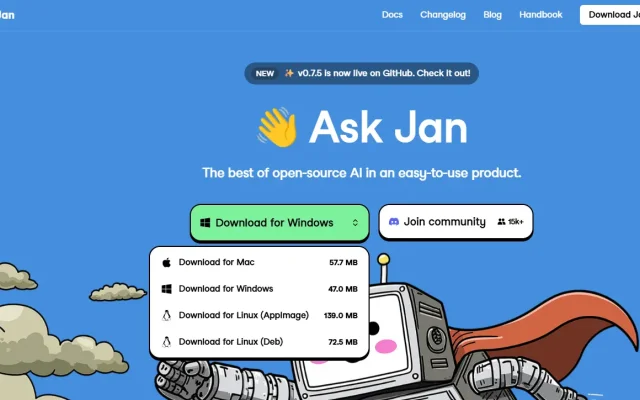
Jan AI is an Open Source platform that turns your computer into a local artificial intelligence server. Its key feature is full compatibility with the OpenAI API, allowing you to use local models in any applications that previously required paid ChatGPT keys. Unlike cloud services, Jan stores all data and processes on your device.
Why choose Jan AI
- Complete privacy: Your prompts and data never leave your computer.
- Model flexibility: Install Llama 3, Mistral, or Gemma in one click, or connect to remote APIs (OpenAI, Claude).
- OpenAI compatibility: The built-in local server allows you to use Jan as a replacement for a paid API in other applications.
- Open Source: It is free and transparent.
Technical requirements: Works on Windows, macOS (including M1/M2/M3 processors), and Linux. For stable operation of local models (inference), your hardware resources are critical:
| Component | Minimum requirements | Recommended (for 13B+ models) |
| CPU | 4 cores (with AVX2 support) | 8+ cores |
| RAM | 8 GB | 32 GB and above |
| GPU | Not required | NVIDIA (8GB+ VRAM) / Apple M-series |
| Disk | 20 GB (SSD) | 100 GB+ (for the model library) |
Key use cases
- Local RAGRAG Retrieval-augmented generation: the model answers from passages found in your documents. CustomGPT: a no-code RAG chatbot (Base Knowledge): Integration with your PDFs, documents, and databases through vector indexes (Chroma/FAISS).
- Development and testing: Using the local endpoint
http://localhost:1337to debug code without spending money on cloud provider APIs. - Private assistant: Configuring custom roles (Coder, Analyst, Editor) while storing chat history on disk.
Detailed guide: how to install Jan AI, load a model, and enable the local API.
Does Jan need an internet connection to work?
Only to download models. After that, you can communicate with the AI in a completely autonomous mode.
Is this program paid?
No, Jan is completely free and distributed under the Apache 2.0 license.
Can Jan AI be used as a replacement for the paid OpenAI API?
Yes. Jan launches a local server that fully mimics the structure of OpenAI requests. You can simply change the base_url in your application to the local one, and it will start working with Llama, Mistral, or Gemma models.
What model formats does Jan support?
Jan works with most modern formats, including GGUF (optimal for CPUs), TensorRT, and other quantized versions that significantly speed up performance on consumer hardware.
Do I need to install additional drivers?
For Windows/Linux users, installing NVIDIA CUDA drivers or ROCm libraries (for AMD) is recommended to utilize the graphics card. On macOS (M1/M2/M3 processors), everything works out of the box thanks to Metal support.
Articles about this tool
FAQ
Do I need a VPN or proxy to use the service?
It depends on your region. If the service is not available in your country, its site says so; a VPN or proxy is a way around regional limits, but follow the rules of the service and the laws of your country. How to choose a proxy is covered in our guide to proxies for Claude. The easiest check is to open the service site.
Is it safe to share my data with an AI tool?
Do not enter passwords, payment details, personal data or trade secrets. Many services store requests and may use them to train models, especially on free plans. Check the privacy policy and the settings of the service, where training can often be switched off.
Similar tools
-
41 0
Free package manager with a built-in Inference UI: install ComfyUI, Forge and Fooocus in one click on Windows, Linux and Apple Silicon Macs.
- Editors' choice
- Infrastructure
- Free
- Image generation
- Run AI yourself
-
15 0
Piggy.to is a powerful tool for creating content right on your smartphone.
- Infrastructure
- Image & Design
- Free
- Web design
-
1 0
Second Brain lets you index local files—documents, images, PDFs, and other formats—by both name and content.
- Infrastructure
- Q&A over documents
-
Gradio web UI for Stable Diffusion: text-to-image and image-to-image, inpainting, outpainting, upscaling and a large extension library.
- Infrastructure
- Free
- Image generation
- Photo editing
- Run AI yourself
-
Node-based visual workflow editor for AI image generation: build, test and tweak models, parameters and results from a large library of nodes.
- Infrastructure
- Free
- Image generation
- Text to video
- Run AI yourself
-
Free one-click Stable Diffusion app for macOS with builds for Apple Silicon and Intel; a simple start for beginners, but updates are slow.
- Infrastructure
- Image generation
- Run AI yourself