AlexHost hosting is a professional infrastructure platform providing dedicated computing power for the most resource-intensive tasks in artificial intelligence. The provider serves as a technical foundation, offering specialized servers with NVIDIA and NVIDIA Tesla graphics cards required for neural network training (Deep Learning), working with large language models (LLMs), and machine learning. Using this solution eliminates the need to purchase expensive hardware or deal with cooling and maintenance, which significantly reduces the initial budget required for any AI project. Compared with running models locally on personal PCs, AlexHost servers provide uninterrupted 24/7 operation and allow you to scale computing power as the complexity of your algorithms or the volume of processed data increases.
Interaction with the platform is designed to provide maximum transparency and fast deployment: after selecting a configuration in the personal account, the user gains full control over a dedicated server with guaranteed resources. When ordering services for AI tasks, the interface and support team help users quickly choose the required OS and driver version, making it easy to get started with Data Science even for those who are just beginning their journey. High-quality network connectivity and high bandwidth ensure that requests to your deployed models are processed without delays, while multilingual support significantly simplifies the daily operation of the infrastructure.
Verdict
The verdict for the professional community is clear: AlexHost is an optimal link in the AI service development chain, providing an ideal balance between performance and GPU rental costs. Considering the service’s privacy-friendly policy and cryptocurrency payment option, it is worth bookmarking as a reliable hub for deploying anonymous, powerful infrastructure that will not let you down during peak loads.
Suitable for: AI developers, Data Scientists, Deep Learning specialists, PBN owners, AI startups, DevOps engineers.
Choosing the Right Plan for GPU Dedicated Servers
Dedicated servers are provided with two powerful, modern graphics cards: 2x RTX 4070 Ti SUPER. Another important advantage is that AlexHost provides a complete set of preinstalled tools and frameworks specifically designed to simplify the deployment and use of large language models (LLMs), allowing you to start working with AI solutions immediately. This gives you a server with a ready-to-deploy AI tool right away.
Also: Any OS can be installed at the customer’s request
Installing LLM Models
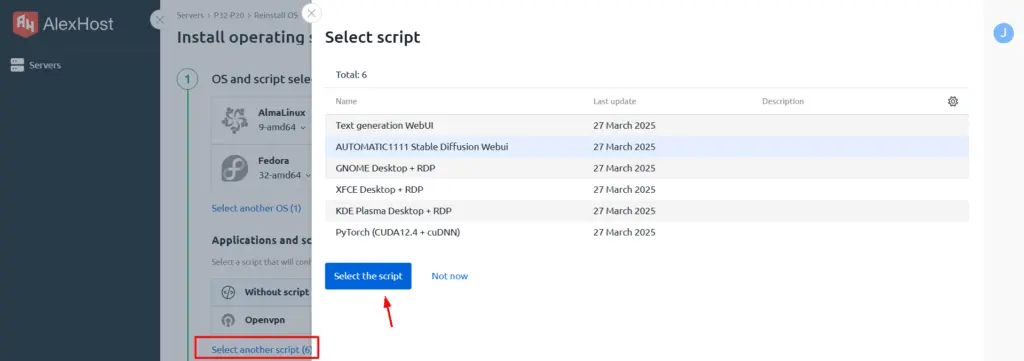
By selecting the Select another scripts option, you will gain access to the installation of all available LLM models. Let’s briefly review each one:
WebUI Text Generation – a web interface for working with text-generation models such as GPT, LLaMA, Mistral, and others. It allows you to load models, configure parameters, and interact with text-based LLMs.
AUTOMATIC1111Stable Diffusion WebUI – one of the most popular web interfaces for generating images with the Stable Diffusion model. It provides a convenient graphical interface for loading models, configuring image-generation parameters, and using additional plugins and extensions.
GNOME / XFCE / KDE Plasma Desktop + RDP – different graphical environments for remotely connecting to a server over the RDP (Remote Desktop Protocol). They are not directly related to LLMs, but can be used to manage and work with a server running AI models.
PyTorch (CUDA12.4 + cuDNN) – a library for working with neural networks and machine learning. It supports GPU acceleration through CUDA and is used to train and run LLMs (such as GPT and LLaMA) and image-generation models (Stable Diffusion).
Please note that the installation process may take up to 30 minutes.
Data centers AlexHost
Europe
North America
Bulgaria
France
Moldova
Netherlands
Romania
Sweden
Switzerland
United Kingdom
United States
AlexHost: questions and answers
Does AlexHost have a free trial or a money-back guarantee?
There is no trial period. There is a money-back guarantee.
Where are AlexHost servers located?
Countries (9): Bulgaria, France, Moldova, Netherlands, Romania, Sweden, Switzerland, United Kingdom, United States.
How can I pay AlexHost?
Payment methods: Cryptocurrencies, Visa / Master Card / МИР, Visa / Master Card, PayPal, GooglePay. Cryptocurrency is accepted.
Applications at VPS order AlexHost
PaaS and control panels
cPanel
DirectAdmin
ISPmanager
Plesk
AlexHost plans Dedicated servers · 3
Pricing verified:
Exchange rates as of 08.11.2026 09:54 UTC (ECB, NBU, CBR, Bybit USDCUSDT). ≈ marks converted prices.
PlanCores / threadsRAMDiskNetworkLocationPrice
2x Xeon E5-2620 v3 + Tesla P4 8GB
2× Intel Xeon E5-2620 v3 NVIDIA Tesla P4 8 GB
Configurable











 PaaS and control panels