Voicemaker
15 0Voicemaker is a text-to-speech service for narration, audiobooks, podcasts and commercials, with many AI voices and fine control over speech.
- Category
- Audio & Voice
- Pricing
- Details on the service site
- Free plan
- Yes
- Use case
- Text to speech
Voicemaker is a versatile text-to-speech service that handles every part of voiceover production, from simple narration tracks for videos to full-length audiobooks, podcasts, and commercials. Essentially, it’s a “virtual voiceover studio”: instead of recording with a microphone and spending hours editing, you simply paste in your text and choose a voice. The platform offers hundreds of standard and AI-generated voices, dozens of languages and accents, and fine-grained control over speed, pitch, pauses, and effects, making it possible to achieve a sound close to that of a human narrator. This makes Voicemaker a significant time-saver: tasks that once required finding a voice actor, a studio, and an editor can now be completed in a few clicks in a browser. The result can be downloaded right away in popular formats and used in videos, courses, or ads.
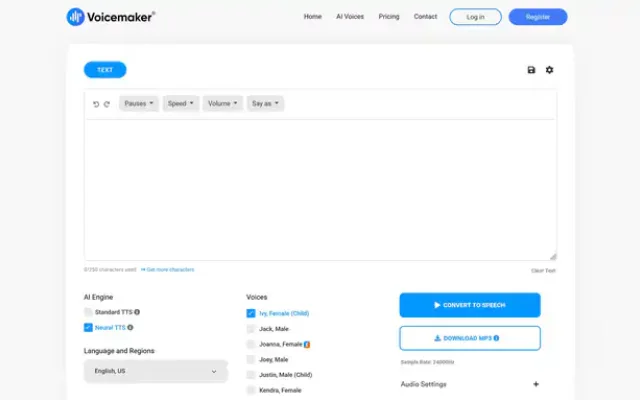
Using Voicemaker is a straightforward experience that even beginners can easily understand. Once they sign in, users see a large text box, a choice of engine (standard or neural), a list of voices and languages, and an advanced settings panel with options for speed, pitch, effects, pauses, and SSML tags. To get started, simply enter or paste a script, choose a suitable voice and language, adjust the tone, and click the convert button. The results sound quite human: neural voices convey intonation, handle long paragraphs smoothly, and avoid the classic “robotic” TTS sound, although pronunciation can occasionally be off for complex names and uncommon words. The interface also matters for everyday use: it’s uncluttered, the workflow is intuitive, and it includes file history, cloud storage, and even a multivoice editor that lets you combine different voices and music tracks in a single file.
In practice, Voicemaker is especially useful for content creators who need scalable voiceovers without hiring narrators: YouTube channels, online learning platforms, SMM and content marketers, game and app developers, and audiobook and podcast creators. It changes how you approach voice work: instead of treating voiceover as an expensive, scarce resource, you can make it a routine but fast part of your production workflow—write the text, run it through Voicemaker, and add it to a video or course. Its pricing model is flexible: there’s a free tier with a character limit, suitable for testing and small projects, while paid plans provide access to premium voices, higher character limits, voice cloning, an advanced editor, and commercial usage rights. Customer reviews are generally positive, praising voice quality, processing speed, and support. Some users criticize the limitations of the free plan, while others occasionally note that certain accents sound noticeably artificial. Overall, Voicemaker looks like a reliable, mature tool worth bookmarking if you work seriously with voiceovers and want to automate the audio presentation of your content.
Suitable for: video bloggers, online schools, marketers, podcast producers, audiobook authors, game and app developers, and owners of business channels.
FAQ
Do I need a VPN or proxy to use the service?
It depends on your region. If the service is not available in your country, its site says so; a VPN or proxy is a way around regional limits, but follow the rules of the service and the laws of your country. How to choose a proxy is covered in our guide to proxies for Claude. The easiest check is to open the service site.
Is it safe to share my data with an AI tool?
Do not enter passwords, payment details, personal data or trade secrets. Many services store requests and may use them to train models, especially on free plans. Check the privacy policy and the settings of the service, where training can often be switched off.
Similar tools
-
28 0
AISPY is an indispensable free tool in the age of AI that lets you determine whether an audio file was generated by AI or created by a human.
- Audio & Voice
- AI & plagiarism detection
-
28 0
Anypod is a platform for content creators that makes their content searchable.
- Audio & Voice
- Paid
- Search engines
-
27 0
Browser voiceover and video studio: natural text-to-speech, emotion control, dubbing, audiobooks and voice cloning for branded content.
- Audio & Voice
- Text to speech
- Voice cloning
-
27 0
WavJourney is an advanced text-to-speech tool. It’s one of the most popular AI speech synthesizers.
- Audio & Voice
- Free
- Music generation
-
26 0
Uberduck is a creative voice-generation service built not just for standard text-to-speech, but also for vocals: speech, singing, and even rap delivery.
- Audio & Voice
- Voice cloning
-
25 0
Covers AI is an AI-powered voice replication tool that lets users create realistic and engaging song covers.
- Audio & Voice
- Paid
- Music generation
- Voice cloning